


 RSMUS.com
While integrating Microsoft Dynamics CRM and Microsoft Dynamics GP, I ran into a situation where I needed to:
- Be able to create new National Accounts in Dynamics GP from Dynamics CRM Accounts
- Populate a customer’s National Account (Parent Customer ID, CPRCSTNM).
National Account Creation
There was not an adapter object listed for national accounts object (RM00105) and after scavenging through the Dynamics GP database schema I was able to find a way to display the Dynamics GP eConnect Store Procedure taCreateParentID which when executed creates a new national accounts record for the existing customer record.
The first step was to expose this Stored Procedure through the Scribe workbench, so what I had to do was extend your use of stored procedures in Scribe, I added the stored procedures to the Scribe metadata tables.
To do this I had to add a record to KSYNCTABLESBASE within the Dynamics GP database, the following fields are required:
NOTE: It is always recommended to take a backup of your existing database before performing direct inserts
TABLENAME – stored procedure name
OWNER – stored procedure owner
TYPE – must be “target_sproc”
UPDATABLE – “Y”
HIDDEN – “N”
The TYPE column in KSYNCTABLESBASE must be set to one of the following: “target_sproc”, “source_sproc” or “other_sproc”. The current implementation only supports “target_sproc” stored procedures.
INSERT
INTO dbo.KSyncTablesBase
(TableName, Owner, Type, Updatable, Hidden)
Values (‘taCreateParentID’, ‘dbo’, ‘target_sproc’,‘Y’,‘N’)
Scribe Job
After running this SQL script against the Dynamics GP database the Stored Procedure is now exposed and I am able to execute it within my Scribe Job.:
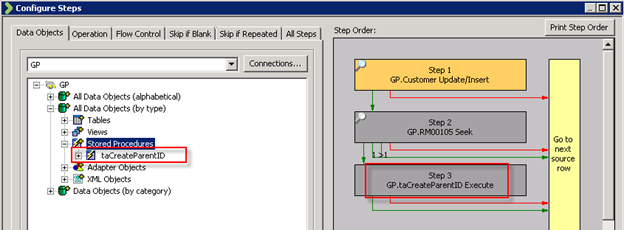
- In this Scribe dts you can see I first update/insert the Dynamics GP customer, I then use a variable to capture the CustomerID from that record.
-
The next step is to seek for the existing national account
- If one exists the job ends
- If no record exists for the corresponding customer ID I then execute the stored procedure.
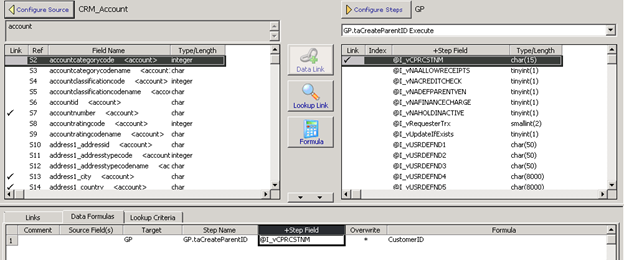
- I pass the CustomerID variable from step 1 to the CPRCSTNM field and it will successfully create a new national account record in Dynamics GP.
Associating the Child to the Parent
My second job is to then insert/create a new customer record in Dynamics GP and assign it to an existing parent customer/National Account.
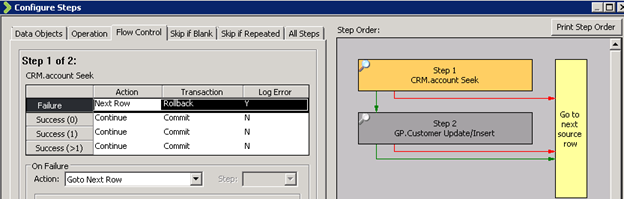
You can see in the scribe dts above I first seek to find the Parent Customer ID listed on the Dynamics CRM account and use a variable to capture that value.
I then tried simply passing that value to the Parent Customer ID field on the customer object in the Dynamics GP adapter, but the parent-child relationship was not created.
After some digging I found the virtual field “Create or Remove Parent Customer” which indicated that if I pass the value of 0 will enable the assignment of the newly created customer to a parent customer, and this worked!


By: Bill Caldwell – Colorado Microsoft Dynamics CRM partner

RSM Staff
RSM empowers middle market companies worldwide to take charge of change. Our unique middle market perspective makes RSM the natural choice for growth-oriented, internationally active organizations seeking relevant insights and tailored, innovative solutions for a complex and changing world. With a global reach spanning more than 120 countries, we instill confidence in a world of change by bringing the full power of RSM to make a lasting impact on our clients, colleagues and communities.