


 RSMUS.com
Microsoft pushed a security update to Microsoft Edge in March 2026. The build versions are 146.0.38562.59 and 146.0.385.62.
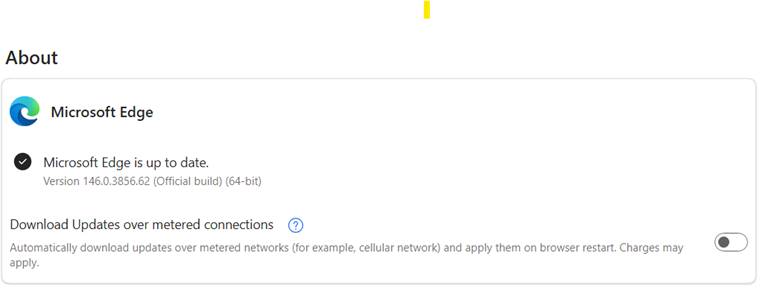
This has caused an issue with those using Edge as their default browser when running Management Reporter reports to the browser option.
The options to Refresh, Publish, Show, and Download are no longer available.

The quickest option is to change your default viewer to be the MR Report Viewer. (NOTE: The Management Reporter Viewer option is not compatible if you utilize Reporting Groups in MR Report Designer)
This can be set by opening Management Reporter Report Designer.
Then click on Tools > Options, and mark the box next to Use Management Reporter Report Viewer as the default viewer.
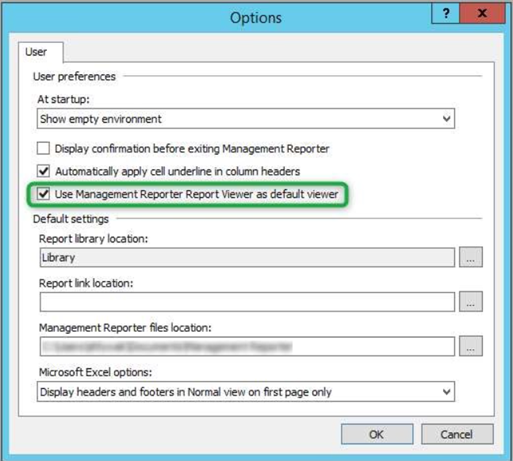
In MR Report Viewer, the options to download to Excel or print are readily available.
If you still have Internet Explorer installed (no longer supported), you can also set it as your default viewer, and the options will still be available.
Microsoft provided the steps below to resolve the issue. However, so far, we have not heard of any/all of these steps resolving the issue. They can be found in this technology blog: https://techcommunity.microsoft.com/blog/coreinfrastructureandsecurityblog/configure-ie-mode-in-edge-with-microsoft-endpoint-intune/3271993
NOTE: For details regarding this Microsoft technology blog, it is strongly recommended that you reach out to Microsoft Edge support for information, support, or advice on what other items might be impacted by this change.
RSM offers access to Certified Microsoft Professionals, help desk and phone support, knowledge and experience with third-party products and dedicated account management. To learn more about who we are, and contact our professionals at erp@rsmus.com or by phone at 855.437.7202.
Gina Lehmann
Gina focuses on Dynamics Great Plains. She is currently a member of the Dynamics GP support desk. She has been with RSM over 7 years. Gina’s area of expertise is in the Dynamics GP core modules (financial, purchasing, and sales). Gina has a BS in Accounting, and over 35 years of accounting experience; with an emphasis in hospitality accounting and systems.