


 RSMUS.com
I’ve been working with Scribe Insight to integrate Microsoft Dynamics AX 2012 with Microsoft Dynamics CRM 2016. I’m using a queue integration to pass sales orders and shipping information between them. We have XML’s that are dropped onto a file share with the shipping information I use to post the packing slips in AX. Although I’m aware you can point to a folder and have the Scribe integration pick up files from within the folder, I like using the queues a little better, and I wanted to keep all of my integration processes similar. I didn’t like having some integrations pointing to a folder, and others pointing to the queue. With a little research, I was able to put together a Windows PowerShell script that allowed me to take the files from the folder and get them to Microsoft Message Queue (MSMQ). Below is the script.
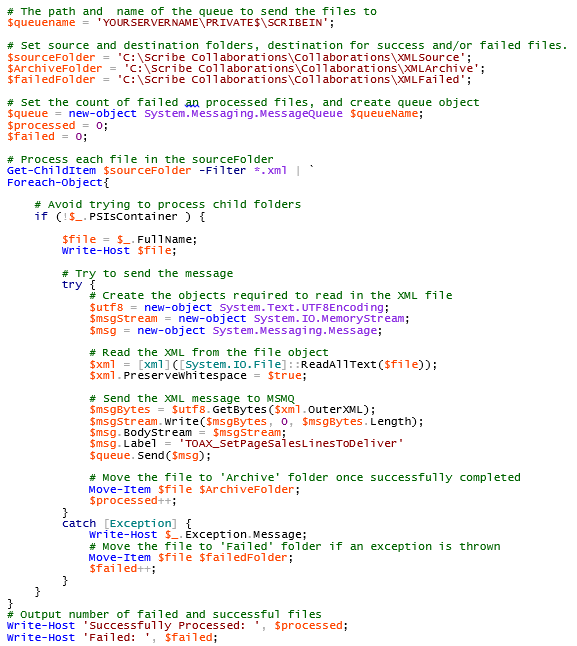
Save the above as a *.PS1 file and execute via cmd or batch file, or schedule in Windows Task Scheduler if needed.
for more helpful tips about getting the most out of your Microsoft Dynamics AX Solution, contact our experts 855-437-7201 or subscribe to our Dynamics Community News publication.
by LaTonia Watne for RSM

RSM Staff
RSM empowers middle market companies worldwide to take charge of change. Our unique middle market perspective makes RSM the natural choice for growth-oriented, internationally active organizations seeking relevant insights and tailored, innovative solutions for a complex and changing world. With a global reach spanning more than 120 countries, we instill confidence in a world of change by bringing the full power of RSM to make a lasting impact on our clients, colleagues and communities.